RainAware
- 3.5
- Rating
- 10.00K
- Installs
- $4.99
- Price

 Analysis by App-foxy
RainAware is the kind of weather app I would open when “Will it rain today?” is too vague a question. Its useful answer is closer to “Should I leave now, or wait a little longer?” The focus is rain timing at a local level, supported by live radar, satellite imagery, lightning information, and storm alerts. I found that approach more practical than simply checking a daily forecast, especially when I was deciding whether to walk, cycle, run an errand, or start something outdoors.
Developed by RainAware, this paid weather app sits in a slightly different place from the usual free forecast tools. It costs $4.99, carries an Everyone age rating, and has reached over 10K installs. Its average rating is 3.5 from around 154 ratings, so it is clearly not a universally loved utility. That feels fair to me: the app has a focused purpose and can be genuinely helpful, but it is not the most complete replacement for a broad weather service.
My advice to a first-time user is to judge it by one simple test: can it help you make a better near-term decision? If you mainly want a week-long outlook, temperature charts, pollen information, or a general weather dashboard, another app may suit you better. If your question is whether rain is approaching your current area and how that should change your plans, RainAware is much easier to appreciate.
You May Also Like

 Blood Strike: 2.5 Anniversary
Blood Strike’s Loadouts Turn Every Drop Into a Tactical Gamble
A close look at Blood Strike’s custom loadouts: how fast access to signature weapons reshapes its battle royale rhythm, rewards preparation, and narrows the gap between fights.

 Pandora - Music & Podcasts
Pandora’s Music Is Easy to Start, but Harder to Recover
Pandora’s strength is its low-effort path from a seed to a station. Its weak spot is how much confidence it asks you to place in connection, setup, and quiet recovery.

 8 Ball Pool
 Is Built on Rivalries, Rematches, and Routine
A close look at the rivalries, rematches, shared routines, and unanswered safety questions that turn a quick pool match into a persistent mobile community.

 Samsung Music
’s Quiet Strength Is Playing What You Already Own
Its reach comes less from spectacle than from dependable access to a personal library. That simplicity is both the app’s strongest retention engine and its ceiling.

 AccuWeather: Weather Radar
AccuWeather Review: A Quick, Clear Forecast for Everyday Decisions
For everyday plans, the best forecast is the one you can understand quickly. AccuWeather makes rain timing, radar, and local conditions easy to act on, with a few trade-offs.

 Hill Climb Racing
Why Hill Climb Racing Still Turns Crashes Into One More Run
A tiny car, a bumpy hill and one more upgrade: Hill Climb Racing keeps resurfacing because its simple chaos makes every near-miss feel personal.
More From Our News Desk
View All News


Getting from installation to a useful rain decision
I’d treat the first launch as a chance to learn one useful routine rather than explore every view at once: focus on the location tied to your next plan, then watch how the rain picture changes. That gives you a practical basis for deciding whether the app’s timing information suits your habits. Once that workflow feels clear, the next section looks at how to interpret those signals with appropriate caution.
What to expect when you open it
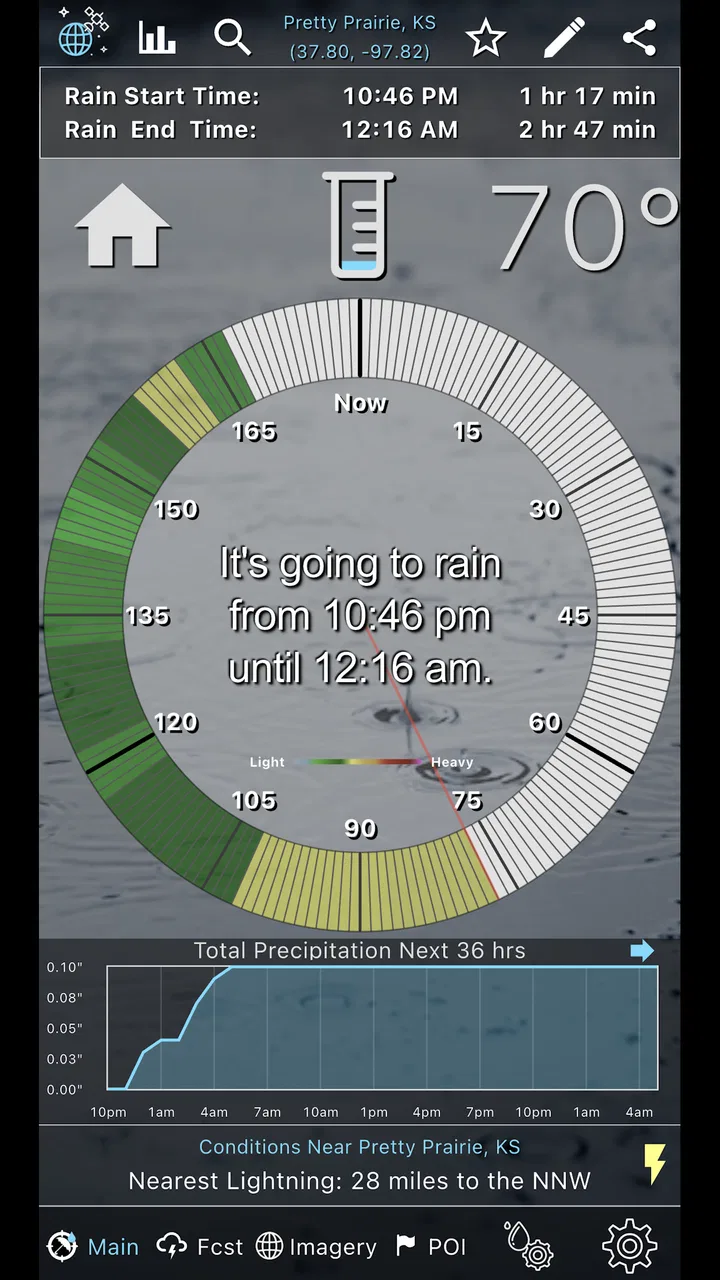
The first impression is not that of a conventional weather portal packed with every possible measurement. RainAware is built around immediate weather awareness. The central experience combines a local view with visual weather information, so I approached it less like a morning forecast and more like a decision tool I could check shortly before going outside.
That distinction matters. A standard weather app may tell me there is a chance of rain during the afternoon, but that can still leave me guessing about the next hour. RainAware is more valuable when the timing matters enough to affect a real choice. I might be deciding whether to take the dog out, carry equipment to the car, leave a café before a shower arrives, or postpone a short outdoor job. The app’s live radar and satellite views give that decision more context than a single percentage.
The weather information is also easier to understand when I treat the map as a moving picture rather than a promise. Radar shows the direction and development of precipitation, while satellite imagery gives a wider view of cloud cover and the surrounding weather pattern. Lightning and storm alerts add another layer when rain is not the only concern. The most useful habit is to combine the timing view with the map instead of trusting one screen in isolation.
I would not install this expecting a large social component, a lifestyle dashboard, or a replacement for every weather-related tool on a phone. The appeal is narrower and more practical. It tries to reduce uncertainty around nearby rain, and that makes it a better companion for short-term planning than for browsing weather as a general interest.
Setting it up without overthinking the first launch
My suggested setup is simple: begin with the location that matters most for your immediate plans, then spend a few minutes learning how the rainfall display moves across the map. A first-time user can easily jump between radar, satellite, and storm information without understanding what each layer is best at. Taking a moment to separate those jobs makes the app feel much less confusing.
Use the radar view when your question is about precipitation moving toward you. Use satellite imagery when the broader cloud pattern helps explain why the sky looks threatening even before rain reaches your position. Lightning and storm alerts deserve more attention when you are planning outdoor activity, because a rain-only decision and a storm-safety decision are not the same thing.
I also recommend checking the app before you are already standing outside in bad weather. Open it during a few ordinary weather changes and compare the moving map with what you can see locally. That small learning step helps you read the display more confidently later. You begin to recognize whether a colored area is approaching directly, passing to one side, or part of a wider band that may change your plans for longer.
The current version is 2.1.7 and it requires iOS 10 or later. That broad system requirement makes the app accessible to people using older compatible devices, although the experience can naturally depend on the screen size and performance of the phone. The app is also rated for Everyone, which fits its straightforward weather purpose rather than suggesting it is aimed at a specialist audience.
The first successful action: deciding whether to leave now
A realistic first success is a short trip that can be delayed without much trouble. Imagine I need to walk to a nearby shop, but dark clouds are gathering. Instead of relying on a generic hourly forecast, I open RainAware and look at the precipitation movement around my location. I check whether the rain is moving toward me, how quickly the pattern appears to be changing, and whether lightning or storm information makes the trip less sensible.
If the rain is approaching soon, I can wait, take an umbrella, or choose another way to travel. If it is moving away or passing nearby without affecting my route, I may leave with more confidence. The app does not remove uncertainty, but it gives me a more useful process than repeatedly refreshing a static forecast.
This workflow is particularly effective for short, flexible plans. It is less decisive for a full day outdoors, where conditions can change beyond the immediate map view. In that situation, I would use RainAware for the near-term decision and a broader forecast source for the rest of the day. That combination is more sensible than asking one focused tool to answer every weather question.
One non-obvious advantage is that the app can help prevent unnecessary interruptions. Instead of cancelling an activity at the first sign of cloud, I can look at the direction and timing of the weather. That is useful for photographers, dog owners, delivery workers, commuters, and anyone who regularly makes small outdoor decisions. The value is not dramatic during calm weather; it appears when a few minutes of better timing make a noticeable difference.
How to read the map without mistaking it for certainty
Weather maps can look authoritative, so I try not to treat every colored area as an exact boundary. A useful approach is to watch the movement rather than stare at one frame. If the precipitation pattern is spreading, splitting, or changing direction, I allow more caution. If it is moving consistently past the area, the timing may be easier to judge, but I still leave room for local variation.
Satellite and radar answer different questions. Radar is the better first stop for “Is rain coming toward me?” Satellite is more helpful for “What larger weather pattern is surrounding this area?” Switching between them is not unnecessary repetition; it is a way to avoid drawing the wrong conclusion from a single visual layer. I found this especially helpful when the sky looked dark but the nearest rain band was not actually headed along my route.
Storm information should also change the way I interpret a simple rain decision. A light shower may only require a delay or a jacket, while lightning can make an outdoor plan inappropriate even if the rain itself seems manageable. That is one of the reasons I would not judge RainAware solely by how quickly it answers a rain question. Its storm-related information adds safety context that a basic precipitation percentage often does not communicate clearly.
For a first-time user, the best routine is to check the local picture, inspect the movement, then consider the consequence of being wrong. If arriving five minutes late is harmless, I may take a chance. If I am carrying electronics, supervising children, or heading into an exposed area, I would use a more conservative decision. The app supports judgement; it does not replace it.
Where new users may become confused
The biggest source of confusion is expecting RainAware to behave like a traditional forecast app. Its strength is immediate rain awareness, not necessarily a complete overview of every weather category. Someone looking for a detailed long-range planning screen may wonder why the experience feels so focused. That is not automatically a flaw, but it is important to understand before paying for it.
Another possible misunderstanding is assuming that a map can provide a guaranteed arrival time for rain. Even a well-presented moving display should be treated as guidance. Local showers can develop, weaken, or change direction. I use the app to improve a decision, not to promise that I will remain completely dry if the screen appears clear.
It is also easy to confuse a satellite view with a precipitation view. Clouds can look impressive without producing rain on my exact route, while rain may be present in a narrower band that is easier to identify on radar. When the two images seem to tell different stories, I return to the question I am trying to answer instead of deciding that one layer must be wrong.
Alerts can create a different kind of friction. Notifications are most useful when they help me notice meaningful changes, but too much reliance on alerts can make me passive. I would still check the map before an important outdoor plan, especially if the consequences of a storm are serious. An alert should prompt a look, not become the only reason I pay attention.
The cost is another consideration. At $4.99, RainAware asks for more commitment than a free weather app, and in-app purchases range from $0.99 to $69.99 per item. That pricing structure means I would examine the purchase screen carefully before confirming anything beyond the initial app cost. A focused tool can be worth paying for, but only if its rain-timing workflow matches how often I actually need it.
Who will get the most from it
I think RainAware is best for people whose plans change because of short-term rain. Outdoor workers, runners, cyclists, dog walkers, parents arranging a school pickup, and commuters who walk between transport connections can all benefit from a more visual view of approaching weather. The app is also useful for anyone who dislikes checking several different sources before making a small decision.
It has particular value when the alternative is repeatedly looking out of a window and guessing. A window tells me what is happening here, but not always what is moving toward me. The radar and satellite context help turn that guess into a more informed choice. This is a modest benefit, yet it can save time and prevent a frustrating interruption several times a week.
I would be more cautious about recommending it to someone who only checks weather for tomorrow’s temperature or a weekend forecast. That person may get more value from a broader free service that combines extended forecasts, warnings, maps, and other daily information in one place. RainAware’s narrower purpose becomes an advantage only when that purpose is genuinely relevant.
It may also be a poor fit for users who want extensive customization, a dense collection of weather measurements, or a highly detailed planning interface. I prefer focused apps when they do one job clearly, but that preference is personal. Before buying, I would ask whether “when will rain reach my area?” is a question I ask often enough to justify a dedicated tool.
A practical routine for commuting and outdoor plans
My preferred routine is to check RainAware at three moments: before leaving, when the sky changes unexpectedly, and just before starting an outdoor activity. The first check helps me choose clothing or transport. The second tells me whether the darkening sky is likely to matter soon. The third is where storm and lightning information become especially important.
For a commute, I would inspect the weather around both the starting point and the destination rather than focusing on only one location. A clear departure does not guarantee a clear arrival. If the route is long, I would treat the app as a near-term aid and combine it with a broader forecast for later parts of the journey. That is a useful trade-off: RainAware can sharpen the immediate decision, while another source may be better for the complete itinerary.
For an outdoor event, I would check the map before setting up rather than waiting until the first drops appear. If rain is nearby but not yet affecting the area, the direction of movement can help decide whether to continue preparing or pause. If lightning or storm information appears relevant, I would prioritize safety over trying to optimize the last few minutes of the schedule.
A less obvious use is deciding when not to start something. If I am about to wash a car, paint outdoors, move furniture, or begin a short repair, a quick look at the rain pattern can prevent wasted effort. The app is not only for escaping rain; it can help me avoid committing to a task that is likely to be interrupted.
How it compares with the usual weather alternatives
Compared with a standard phone weather app, RainAware feels more specialized and more immediate. A built-in weather tool is usually convenient for temperature, general conditions, and a quick forecast. RainAware earns its place when I need a closer look at nearby precipitation and want visual context rather than a single forecast line.
Compared with a general weather service, it may feel less satisfying if I want one place for every possible weather detail. The broader service is usually the better choice for planning several days ahead, comparing temperatures, or checking a wide range of daily conditions. RainAware is the better companion when the decision is local and time-sensitive.
Compared with simply looking at a radar website, the app’s value is convenience. I can make the check from a phone during the moment when I need an answer, then move on with my plan. That convenience matters more to me than having the largest possible collection of meteorological information. Still, users who already have a radar workflow they trust may not gain enough from adding a paid app.
The trade-off is therefore easy to describe. You give up some all-purpose breadth in exchange for a sharper focus on rain timing, visual movement, and storm awareness. I would choose RainAware alongside a general weather app, not necessarily instead of one. That combination avoids forcing a specialized rain tool to handle long-range planning while still giving me a faster way to judge the next outdoor decision.
My recommendation after using it as a decision tool
RainAware makes the most sense when weather affects your schedule in small but frequent ways. Its live radar, satellite perspective, lightning information, and storm alerts work together to answer a practical question: should I go now, wait, change the route, or cancel? That is a more useful goal than simply displaying another temperature number.
I like its focused identity, but I would not describe it as an automatic recommendation for every phone. The 3.5 average from around 154 ratings suggests that the experience has not worked equally well for everyone, and the paid entry point makes the decision more deliberate. I would also remember that the optional purchases can range from $0.99 to $69.99 per item, so I would review each offer carefully rather than assuming every capability is included.
For a first-time user, the path to value is reassuringly short: open the local view, watch the precipitation movement, compare radar with satellite context, check storm information when relevant, and use that picture to make one immediate decision. Once that routine becomes familiar, the app stops feeling like another forecast to interpret and starts feeling like a practical timing aid.
My final view is that RainAware is worth considering for people who regularly need to know what the next stretch of weather is likely to do. I would recommend it to a friend who walks, cycles, works, or plans outdoors and is tired of vague rain percentages. I would steer someone else toward a broader alternative if they mainly want a complete forecast dashboard. Its real strength is not predicting every aspect of the weather; it is helping me decide what to do before nearby rain becomes my problem.
FAQs for RainAware
01What is RainAware, and how does it work?
RainAware is a weather app designed to provide short-term, location-based rain forecasts. After allowing access to your location, it shows whether rain is expected nearby and estimates when it may begin or end. During testing, its main strength was presenting precipitation timing in a simple, practical format rather than overwhelming users with a large amount of general weather information.
02Is RainAware accurate enough for everyday planning?
RainAware can be useful for decisions such as walking the dog, commuting, exercising outdoors, or choosing the best time to leave home. However, no weather application can guarantee perfect accuracy, especially when storms develop quickly or conditions change unexpectedly. Forecast quality may also vary by region, available weather data, and the precision of your selected location, so it is best used as a helpful guide rather than an absolute guarantee.
03Does RainAware require location access or an internet connection?
RainAware generally works best when it can determine your current location, either through device location services or a manually selected place. An internet connection is also important because the app needs updated weather information from online data sources. If location permissions are denied, you may need to enter a location yourself, while limited connectivity can prevent forecasts from refreshing or displaying the latest precipitation information.
04Is RainAware free to download and use?
RainAware may be available as a free download, although the exact features, advertising, subscriptions, or in-app purchase options can depend on the version and platform. Before installing, check the Google Play Store or Apple App Store listing for current pricing and purchase details. Also review the permissions requested by the app, particularly location access, and confirm that any optional premium features are worthwhile for your needs.
05Who should consider downloading RainAware?
RainAware is most suitable for people who need quick, rain-focused information instead of a full weather dashboard. It can be particularly convenient for commuters, cyclists, runners, travelers, parents, and anyone planning outdoor activities around possible showers. Users seeking detailed radar tools, long-range forecasts, severe-weather alerts, or extensive climate information may prefer to use RainAware alongside a more comprehensive weather service.
Pros
- Provides highly localized rain forecasts for your current area.
- Rain timing updates can help plan commutes and outdoor activities.
- Clean interface makes forecast information quick to scan.
- Useful visual radar-style presentation of approaching precipitation.
- Supports weather planning without requiring a full weather app suite.
Cons
- Accuracy can vary during rapidly changing or localized weather.
- Some advanced features may require an in-app purchase or subscription.
- Frequent location updates may increase battery and data usage.
- Coverage and forecast detail may differ between regions.
- The app is less useful when you need broader long-range weather information.

RainAware
Gallery